Login Apply
Mobile app

The JustDoFit app: your club in your pocket

One app for iOS and Android with a mode for everyone: clients book and pay online, club trainers run classes and mark attendance, and personal trainers run their own practice.

  • iOS and Android
  • Free for clients
  • Multi-language support
  • Choose your data region: EU or CIS
Class page with available spots in the JustDoFit app Home screen of the JustDoFit app with upcoming classes
For clients

Everything about the club in one app

Clients find a club or a trainer, book classes, buy memberships and pay online — no phone calls and no queues at the front desk.

Schedule and booking in a couple of taps

Clients see the club schedule and book group and personal classes right in the app.

  • Class calendar with a category filter
  • Trainer, price, available spots, photos and video of the class
  • Pay with a membership, from the balance or by card online
  • A comment for the administrator when booking
  • Private groups with a booking code
  • Advance booking, if the club allows it
  • Add the class to the phone calendar
Booking a class with a choice of payment method in the JustDoFit app

Your classes under control

Upcoming classes are always on the home screen, and plans can change without calling the club.

  • Upcoming classes on the home screen and the full booking history
  • Waiting list: a push notification when a spot frees up
  • Free cancellation before the club's deadline: the class goes back to the membership, the money to the balance
  • Book again after cancelling
  • Self check-in during the class
  • Open access with a membership, no booking needed
The client's list of classes in the JustDoFit app

Memberships, freezes and a personal QR

All of the client's memberships, with the remaining classes and validity, are in the personal account.

  • Active and finished memberships with the remaining classes and visits
  • Multi-club memberships for club networks
  • Freeze from the app: period, comment and documents
  • A free freeze after the club approves it, or a paid one that applies instantly
  • Unfreeze early
  • A personal QR code for entering the club and checking in to classes
  • Several clubs and roles in one account
The client's personal account with a QR code, memberships and balance

Store, bar and room rental

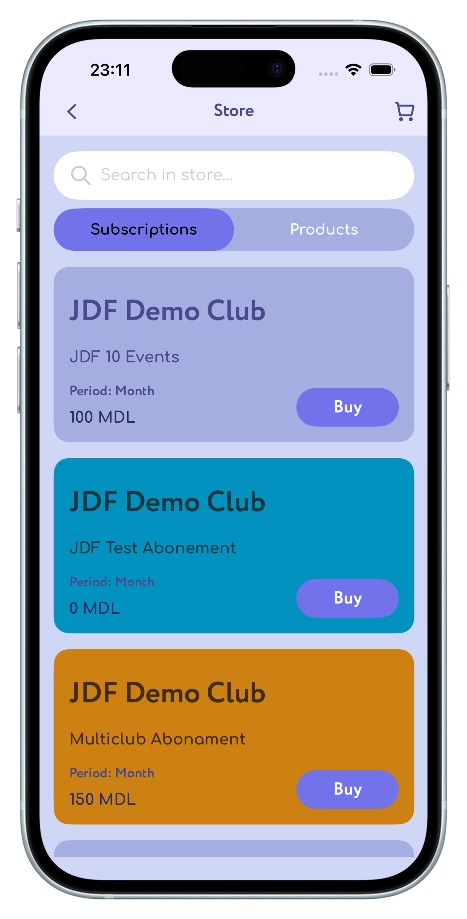
The club sells memberships, products and services right in the app — clients pay and pick up at a convenient time.

  • Memberships, products, bar and rooms in one store
  • Product page with ingredients and nutrition facts
  • Cart, pickup or delivery
  • Pay from the balance, by card online or in cash at the club
  • Room booking: date, package and a free time slot
  • Today's room bookings on the home screen
The club store in the JustDoFit app

News, promotions and tips

The club publishes news and promotions, and clients learn about them right away.

  • The club's news and promotions feed
  • Hot promotions on the home screen
  • A push notification on publication
  • Promotions start and end on schedule
  • Go from a news item to a class, a product or a club
  • Useful tips from the club
Club news and promotions in the JustDoFit app

Balance and online payments

Clients top up the balance and pay by card, and the money goes to the club's account.

  • Card payments: PayNet, bPay and MIA in Moldova, bePaid and YooKassa in other countries
  • Memberships and bookings are activated right after payment
  • Top-up and charge history for 7, 30 or 90 days
  • Order and club visit history
Learn more about online payments
Balance and transaction history in the JustDoFit app

And more for clients

  • Clubs and trainers nearby

    Partner clubs on a map with directions and a searchable catalog of personal trainers.

  • Water reminders

    Clients set the amount, the interval and the time of the reminders.

  • Club support

    A request to the club on any topic, with files and the preferred way to get in touch.

  • Notifications by topic

    Push and email about bookings, memberships, promotions and orders are switched on separately.

  • Multi-language

    The app interface is available in several languages.

  • Share with friends

    A link to a class, a product or a club opens right in the app.

For club trainers

Classes and attendance on the trainer's phone

The club adds a trainer to its team in the CRM, and the trainer gets a work mode in the app right away.

The whole day on one screen

The trainer's home screen shows what is happening now and what comes next.

  • Number of classes today
  • A live countdown to the next class or to the end of the current one
  • My upcoming classes and my schedule
  • Club schedule with a category filter
  • Club news and promotions
Upcoming club classes in the JustDoFit app for trainers

Run the class and check everyone in

The trainer starts the class and marks attendance without paper lists.

  • Start and finish a class in one tap
  • List of enrolled clients with contacts
  • Mark each client as visited or missed
  • "Mark all enrolled" and confirm everyone with open access at once
  • Enroll a client by scanning their QR code or from a list
  • Notifications about new bookings and cancellations
List of clients enrolled in a class in the JustDoFit app

How a trainer gets started

  1. 1

    The club adds you

    The club administrator adds you to the team in the JustDoFit CRM.

  2. 2

    Install the app

    Download JustDoFit from the App Store or Google Play and sign in to your account.

  3. 3

    Choose the Trainer role

    The app opens the trainer mode with your classes. You can switch roles in your profile.

For personal trainers

Your own practice — no club and no CRM needed

Personal trainers manage clients, schedule and memberships right in the app, and clients find them in the catalog and book online.

First month free

Your clients

Everything about each client in one card.

  • Search clients, see active and deleted ones
  • Add clients by phone, email or their QR code
  • Create a new client in a minute
  • Client card: contacts, segment, balance and active memberships
  • Confirm the account, block and restore clients
Client card in the JustDoFit app for personal trainers

Schedule and workouts

Create group and personal workouts and book clients on them.

  • Your own categories: yoga, pilates, cardio and anything else
  • Working hours
  • Group and personal workouts
  • Client bookings and a waiting list
  • Start, finish and mark attendance
A personal trainer's workout schedule in the JustDoFit app

Sales and a profile in the catalog

Sell your own memberships and get new clients from the app.

  • Your own memberships: price, number of classes, duration, categories and freeze terms
  • A trial class for new clients
  • Sell a membership with a discount
  • Top up a client's balance: cash, card or online
  • Client requests to your support
  • A profile in the "Personal trainers" catalog with your schedule, education and achievements
A personal trainer's home screen in the JustDoFit app: clients, memberships, support requests and upcoming workouts

Get started in 5 steps

The checklist on the trainer's home screen shows what to set up

  1. 1

    Working hours

    Set the hours when you hold workouts.

  2. 2

    Categories

    Add the types of workouts you lead.

  3. 3

    Memberships

    Create memberships to make booking easier for clients.

  4. 4

    Your profile

    Fill in your profile — this is how clients see you in the catalog.

  5. 5

    Done

    Finish the setup and add clients and workouts.

For owners and managers — the club in your pocket

The main work happens in the CRM, and the app always shows what matters most about the club.

Learn more about the CRM
  • New clients, birthdays, orders and freeze requests on the home screen
  • Quickly add trainers, classes, promotions, categories and tips
  • Scanning a client's QR opens their card or adds them to the club
  • Sell memberships and top up client balances
  • Manage every class of the club

Small things people love about the app

  • Waiting list

    A spot frees up — the client gets a notification and books it.

  • Fair cancellation

    Cancel in time and the class or the money comes back automatically.

  • QR everywhere

    A personal QR, a membership QR and a club QR for quick entry and booking.

  • Class countdown

    The trainer sees how long is left until the class starts or ends.

  • Club networks

    Multi-club memberships and switching between clubs in one account.

  • Local payments

    PayNet, bPay and MIA in Moldova, bePaid and YooKassa in other countries.

  • Open access

    Membership holders come without booking, and the trainer confirms everyone at once.

  • To your phone calendar

    Add a class to the calendar in one tap.

Download JustDoFit

The app is free for clients, and JustDoFit takes no commission on payments.

Frequently asked questions

How much does the app cost for clients?

The app is free for clients. They only pay the club or the trainer for memberships and classes, and JustDoFit takes no commission on payments.

Which devices does the app work on?

iOS and Android smartphones. Download JustDoFit from the App Store or Google Play.

How does a club trainer get access?

The club administrator adds the trainer in the CRM. After signing in to the app, the trainer chooses the Trainer role and sees their classes.

Can I work as a personal trainer without a club?

Yes. Register as a personal trainer right in the app: the first month is free, then the plan on the Prices page applies.

Which payment methods are available to clients?

Charging a membership or the balance, and card payments online: PayNet, bPay and MIA in Moldova, bePaid and YooKassa in other countries. Store orders can also be paid in cash at the club.

Can I use the app at several clubs?

Yes. Clients add several clubs, choose a main one and switch between them, and multi-club memberships are valid across the whole network.

Can I be a client and a trainer at the same time?

Yes. If your account has several roles, switch them in your profile.

Can the club have an app under its own brand?

Yes, with White Label the club gets its own app in the App Store and Google Play. Details on the Prices page.

Get the app for your club

Send a request — we will show you the app and the CRM and help you launch them in your club.

I give my consent for processing of personal data